Concept project · Law firm management software
Law firm management software: matters, deadlines, billing and a client portal
Halberg & Wierzba is a Primessio concept project: law firm management software built to order, together with the firm’s website in three languages. The team runs matters from the conflict check to closing: deadlines calculated with a written explanation, documents with versions, checklists for every stage, letters from templates, time tracking with approval and handover to billing, and invoices with credit notes. Clients see their matters, deadlines, documents and invoices in a client portal. Permissions follow roles and people, sign-in is protected by MFA, and the system administrator has no access to case files. The firm, people, matters and amounts are fictional; the backend, processes and tests are the ones we deliver to clients.
A Primessio showcase for law firms: practice management, a client portal and the firm’s website in one project. The PHP 8.3 and SQLite backend runs on ordinary web hosting, and automated tests check every rule — from deadline calculation to credit-note numbering.
Primessio is a software house based in Warsaw: websites and online stores, custom software and IT systems, SEO and AI SEO, social media and content, branding and project management — for clients in Poland and the DACH region. Below is one of our projects.
Product showreel
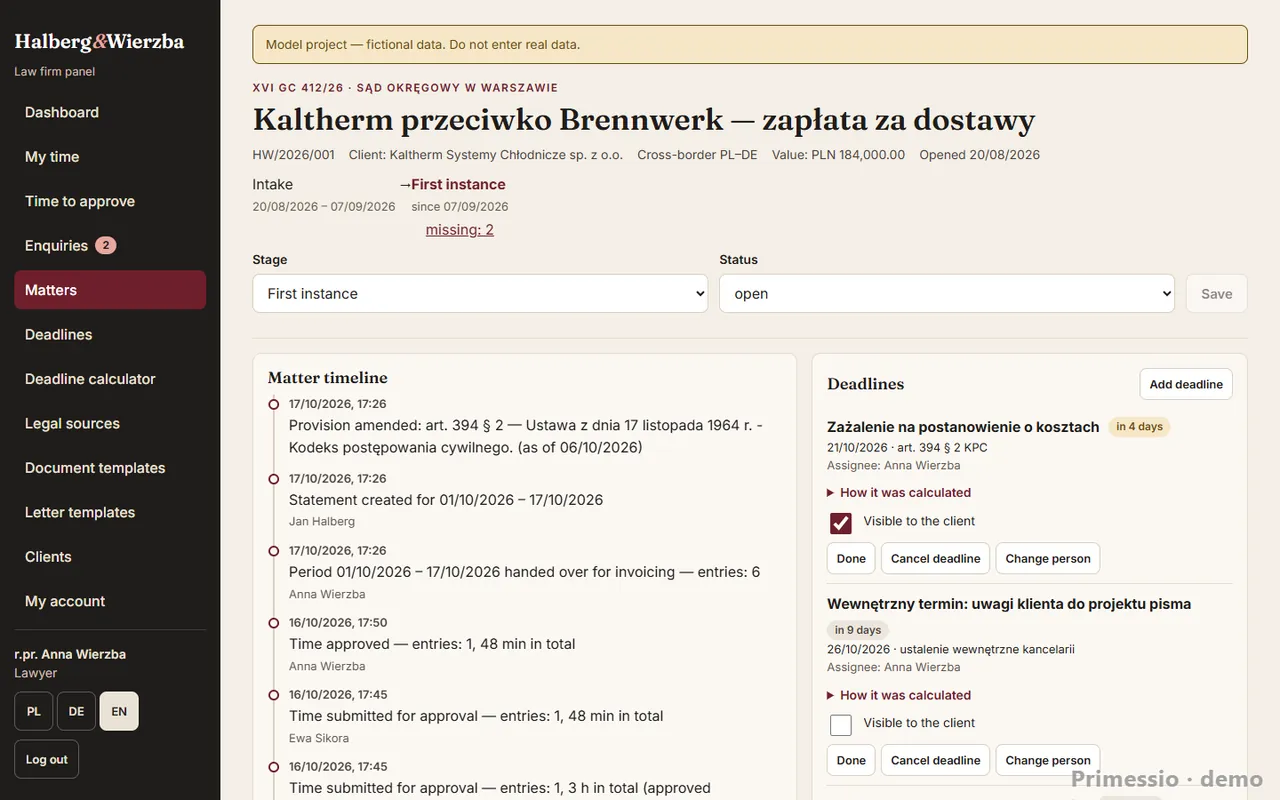
A showreel of 12 screens from the demo, watermarked: the firm’s website, the team panel, billing, the client portal and accounts. The live demo is open — you enter the panel and the portal with a demo person’s button, no password. The data is fictional and resets every night. · Open the showreel in a new window ↗
Try the demo ↗ Firm panel (demo) ↗Client portal (demo) ↗
The panel and portal open without a form: pick one of the demo people on the sign-in screen (no password) and the language PL, DE or EN. The data is fictional, and the demo resets every night.
Challenge
A law firm works to deadlines that must not be missed and with documents that go through many versions. The usual picture: deadlines in one person’s calendar, files in folders on a shared drive, time in a spreadsheet filled in at month end, invoices in a separate program — and clients emailing to ask where their matter stands. Nobody sees the whole picture, and the conflict check depends on the team’s memory.
On top of that come requirements ordinary tools don’t enforce: professional secrecy and GDPR, clear roles (who sees amounts, who approves time, who issues a credit note), a trail of every change and invoices that meet tax rules. For firms with cross-border clients, work in more than one language as well.
Solution
We built law firm software where the matter is the centre of work. The matter page brings together the timeline, parties, deadlines, tasks, notes, versioned documents, the document checklist for the current stage, letters, time and billing. Before a matter is accepted, the system runs a conflict check across all records — by name, tax ID, company register and personal ID numbers — and each team sees only the matters within its scope.
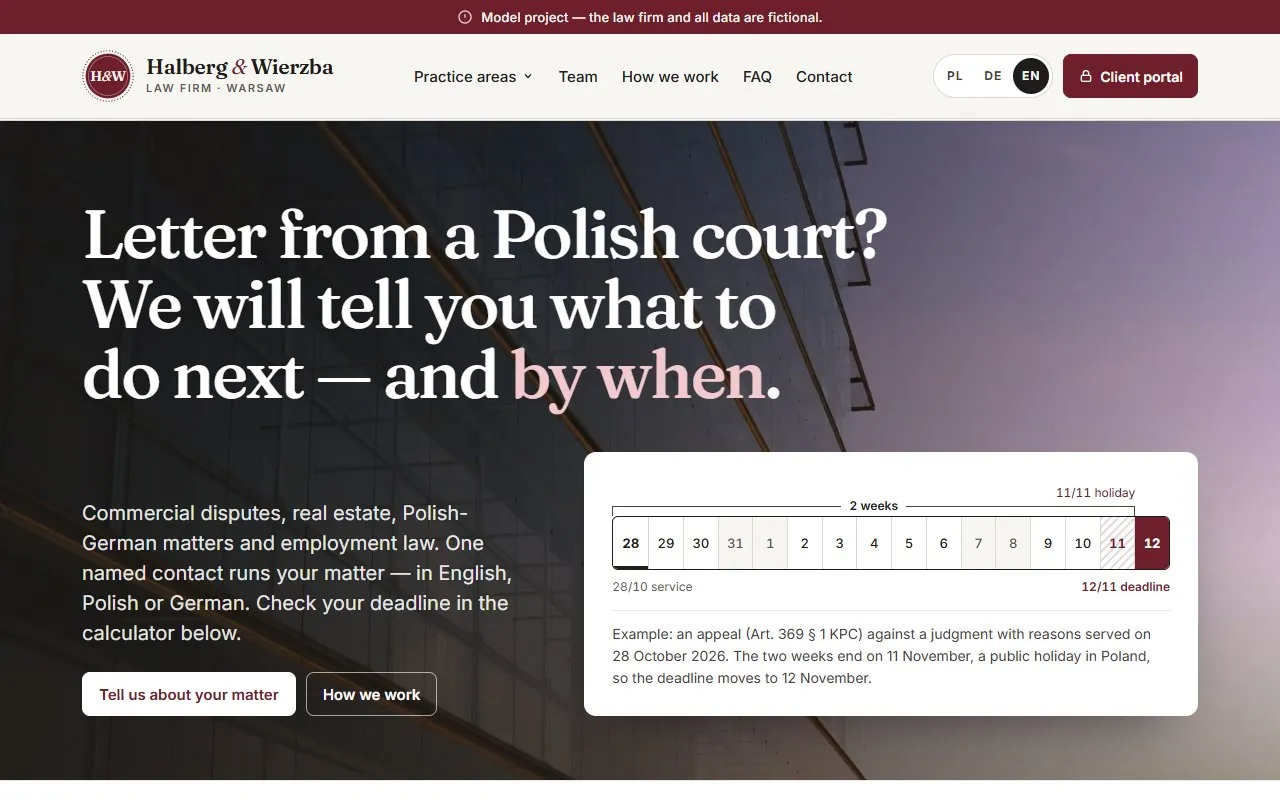
A calculator works out deadlines under Polish civil law (Articles 111–115 of the Civil Code), moving them off Saturdays and public holidays and showing the reasoning step by step; the demo carries Polish procedural rules, and we configure the rules for the firm’s jurisdiction at implementation. Letters are built from the firm’s templates with fields filled from matter data; the preview matches the PDF.
Time goes through a workflow: draft, submission, approval or rejection with a reason, handover of a period to billing and a billing statement. Invoices are corrected with credit notes instead of being cancelled (numbering without gaps), and payments and refunds are recorded entries. The demo shows Polish invoicing, including a file for Poland’s KSeF e-invoicing system (FA(3), validated against the XSD schema, not sent).
Clients use the client portal: they see their matters, deadlines the team has made visible, shared documents and invoices, and message the team in the matter’s thread. Staff accounts have roles, matter scopes and individual permissions; broader rights go through a request for approval, and sign-in is protected by MFA. The system administrator manages accounts without access to case files.
Scope — what we delivered
Matters and conflict checks
Matters with stages, parties, team and a timeline; a conflict-of-interest check before accepting a matter and when client details change, recorded in the event log.
Court deadlines
Month and week calendar, a deadline calculator with the legal basis and reasoning, and deadlines that can be made visible to the client.
Documents and versions
PDF, images, DOCX and XLSX with versions, preview and links to tasks; file type checked by content, only deliberately chosen versions shared with clients, and a bin with restore.
Document checklists
Templates for every practice area and stage; missing required documents show on the matter, the matter list and the dashboard.
Letters from templates
Firm templates with fields from matter data, a preview identical to the PDF, a list of missing data, approval in one step and the PDF filed with the matter’s documents.
Time tracking with approval
Weekly timesheet, submission per entry or per week, approval and rejection with a reason, corrections visible to the author, and handover of a period to billing.
Billing and credit notes
Hourly and fixed-fee agreements, billing statements, invoices, credit notes instead of cancellation, part payments, refunds and an accounting view without matter content.
KSeF FA(3) — demo
For firms in Poland: an FA(3) file for every invoice and credit note, validated locally against the Ministry of Finance XSD schema; an invalid file blocks issuing. Not sent in the demo.
Client portal
The client’s matters with stage and deadlines, shared documents, invoices and a message thread with the team; views built from an explicit field list, and someone else’s matter returns 404.
Roles, permissions, sessions and MFA
Roles as templates plus individual grants and revocations, matter scopes, requests approved by a partner, MFA (TOTP) with backup codes, session limits and an access log; administration without access to case files.
Firm website PL · DE · EN
Home page with a worked deadline example, practice areas, team, how the firm works, FAQ and an enquiry form that lands in the panel.
Assistant on the firm’s website
A rule-based assistant in three languages on every page of the firm’s website. It answers only from the site’s content, prepares an enquiry (person or company and practice area) and opens the form with the fields filled in, and works out a procedural deadline in the conversation with the firm’s own calculator, with the same disclaimer. It does not assess matters, points urgent situations to the phone first, asks visitors not to type personal data and does not keep the conversation. The demo can be rated in 30 seconds, with a voucher as a thank-you: €250 net towards Primessio running a Google Ads campaign, valid for your next project with Primessio (terms in the rating window).
Testing and launch
Backend tests, end-to-end browser tests in the panel and portal, a UI audit, backups with a restore check and launch on web hosting.
Billing and tax model
The demo shows the Polish model: a professional partnership with income tax on an accrual basis and VAT under the standard rules. At implementation we configure the system for your firm’s tax and accounting regime and confirm the settings with the firm’s tax adviser.
Legal form and income tax
Sole practice, partnership, LLP or company — the system reflects the firm’s own model.
VAT and invoice content
Tax rates, reverse-charge wording, exemption grounds and required invoice details follow the law the firm operates under.
Invoice retention
Retention periods follow the firm’s billing and tax model — in the demo, the Polish rules for the model shown.
Law as of 2026. This describes system configuration and is not tax advice.
Security
Client data is covered by professional secrecy, so security is part of the system’s architecture. Among other things, we provide mechanisms such as:
Roles and permissions
Least-privilege principle: everyone sees only what they are entitled to.
System administration without access to case files
Whoever manages the system cannot open the content of matters.
Two-factor authentication
An additional sign-in factor for the firm’s team.
Sessions with a time limit
An unused session expires automatically.
Tamper-resistant event log
An audit trail that cannot be quietly edited.
Encrypted off-server backup
With an automatic restore test that confirms the backup works.
Data and configuration not reachable from the network
Files holding data and settings are not publicly exposed.
Security headers and form protection
Standard browser-level and form protections against abuse.
Assistant that keeps no conversation
The conversation exists only in the browser tab’s memory: it is neither stored nor sent to the server. The assistant’s only network requests are fetching the rule and calculating a deadline (rule and date).
At implementation we configure these mechanisms for your firm — in its own infrastructure and with its own access rules.
The full chain — what Primessio delivered
Primessio runs projects from analysis to campaign, in one place. In this project we delivered:
-
Concept
The firm’s processes as rules: matter stages, deadlines, conflict checks, roles and billing.
-
Build
Practice management system, client portal and firm website: backend, panel, tests and launch on web hosting.
-
Content
Website, panel and portal copy transcreated PL/DE/EN.
The other stages — Analysis · SEO, AEO and LLM · Campaigns · Measurement and growth — are also part of our full service. See how full service works →
How it works — step by step
This is the system in day-to-day use: first through the eyes of the team running a matter, then through the eyes of the client and the people responsible for billing and accounts. You can check all of it in the open demo.
The firm’s team
-
Runs a conflict check
Before accepting a matter, the team checks the person or company across all records. A hit shows the matter and the party’s role, and the result goes into the event log.
-
Opens the matter and gets a checklist
The matter gets a stage, a team and the document checklist from the firm’s template. Missing required documents are visible straight away.
-
Calculates a deadline and adds it
The calculator gives the end date with its reasoning. The deadline goes into the calendar with a responsible person.
-
Drafts a letter from a template
Fields from the matter fill in automatically, and missing ones appear in a list. Approval creates a PDF in the matter’s documents.
-
Records time and submits the week
Time lands on the weekly timesheet as a draft. Once submitted, it is approved or rejected with a reason the author sees next to the entry.
-
Replies to the client in the matter thread
A client’s message from the portal shows on the dashboard. The team replies on the matter page and deliberately shares chosen documents and deadlines.
Partners, accounting, administration and clients
-
Partners hand time over to billing
A period of approved time goes into a billing statement under the agreement — hourly or fixed fee. An approved statement does not change when rates change.
-
The invoice is checked before issuing
The system checks required details before issuing. In the Polish demo it also creates the schema-validated KSeF file, without sending it.
-
Credit notes instead of cancellation
Changes to the amount, lines or buyer details go through a credit note with gap-free numbering. Overpayments go to refunds.
-
Accounting works without case files
Accounting sees invoices, payments, credit notes and XML files, but not matters. Removing a single permission hides a matter’s amounts.
-
Administration manages accounts
It creates accounts, sets roles, scopes and permissions, and handles a leaver with handover of matters. Broader rights go through a request.
-
Clients check progress in the portal
They see the stage and next deadline, download shared documents and invoices, and message the team — without phoning to ask how things stand.
Capabilities and extension options
The system is modular. These are modules we can add when implementing it for your firm — we shape the scope around how your team works and the tools you already use.
Options for client implementation — not part of the project shown.
Accounting integration
We can pass invoices, credit notes and payments to the firm’s or its accountant’s software — by file or via an API.
Business benefit: Accounting doesn’t retype invoice data.
KSeF submission for firms in Poland
We can connect submission of FA(3) files to Poland’s KSeF with the KSeF number stored on the invoice, starting in the test environment.
Business benefit: Invoices are submitted from where they are created.
Online payment in the client portal
We can add invoice payment through a payment provider, with the payment recorded on the invoice automatically.
Business benefit: Clients pay where they see the invoice, and the balance updates itself.
Email and SMS notifications
We can send deadline reminders to the team and notices to clients about new messages, documents or invoices, with a choice of channel.
Business benefit: Less checking the panel just in case, and faster updates for clients.
Data migration from your current system
We can move matters, clients, deadlines and documents from existing tools — CSV, spreadsheets or the old program’s export — with a reconciliation before switching over.
Business benefit: Start in the new system with complete records.
Deadline rules for your jurisdiction
We can extend the deadline calculator with the rules of the jurisdiction the firm works in, including its public holiday calendar.
Business benefit: Deadlines are calculated under the rules your team works with.
Team calendars
We can sync court and internal deadlines with the team’s calendars on phones and in email.
Business benefit: Deadlines show where the team already plans its day.
Partner reports
We can add reports: time by matter, person and practice area, fixed-fee profitability, overdue receivables and workload, with export.
Business benefit: Decisions on rates, agreements and staffing based on the firm’s own data.
Assistant with a language model
We can connect the on-site conversation to a language model that answers only from the firm’s website content, keeping today’s boundaries: no assessment of matters, no legal advice, with a pointer to the form or the phone.
Business benefit: Answers to questions phrased in the visitor’s own words.
In numbers
A concept project has no business results — these are checkable facts from the repository and tests.
How we worked
Stages with their own specification, plan and independent code review: first matters and deadlines, then documents, letters and billing, the portal and website, hardening, accounts and permissions, and the time and invoice workflow — each closed with tests before the next began.
Specification
The firm’s processes written as rules: matter stages, deadline calculation, conflict checks, roles and who sees amounts.
Core: matters and deadlines
PHP 8.3 and SQLite without a framework: matters, clients, parties, deadlines with reasoning, tasks and a hash-chained event log.
Documents, letters and billing
Document versions, checklists, templates with PDF, agreements, billing statements and invoices.
Portal and firm website
A client portal with data isolation and a website in three languages with an enquiry form into the panel.
Hardening, accounts and MFA
Versioned writes, bin, limits, roles and permissions, requests, sessions and MFA — after an audit with a findings register.
Time and invoices
Time approval workflow, handover to billing, credit notes, payments, refunds and the KSeF file with XSD validation.
Launch
Package to web hosting, cron, backups with a restore check and checks of pages, panel and API on the live version.
Technology
Backend in PHP 8.3 without a framework, with SQLite — it runs on ordinary shared hosting, no separate server. Application code, the database and matter files sit outside the public directory and are served only after an access check. The panel and portal are Astro with Preact islands; the firm’s website is static, so it loads fast.
- PHP 8.3
- SQLite
- PHPUnit
- Astro 7
- Preact
- TypeScript
- tFPDF
- KSeF FA(3)
- XSD
- TOTP (MFA)
- Schema.org
- hreflang
- Playwright
- PL · DE · EN
Frequently asked questions
Is Halberg & Wierzba a real law firm?
No. Halberg & Wierzba is a Primessio concept project — the firm, people, matters, clients and amounts are fictional, and the letters in the demo are not legal advice. The panel, portal, billing and tests are real and the same as in our client projects.
What does Primessio’s law firm management software include?
Matter management with conflict checks, a deadline calendar with a calculator, versioned documents, checklists, letters from templates, time tracking with approval, billing with credit notes, a client portal, roles and permissions with MFA, and the firm’s website in several languages. We shape the scope around the firm.
How does the system calculate deadlines?
In the demo, under Polish law (Articles 111–115 of the Civil Code): excluding the day of the event, moved off Saturdays and public holidays, with the legal basis and step-by-step reasoning. At implementation we set up the deadline rules and holiday calendar of the firm’s jurisdiction.
How does the conflict check work?
Before a matter is accepted, the system compares the person or company with the parties to every matter — by name, tax ID, company register and personal ID numbers. A client and opposing party pair is a conflict; other hits are flagged as related. A person makes the decision, and the result is recorded in the event log.
How does the system protect a firm’s data?
Data is protected in layers: roles on a least-privilege basis, two-factor authentication, time-limited sessions, a tamper-resistant event log and an encrypted off-server backup with an automatic restore test. System administration cannot open case files. At implementation we configure these mechanisms for your firm, in its own infrastructure.
Which billing and tax models does it support?
Your firm’s model: at implementation we configure the system for your firm’s tax and accounting regime and confirm the settings with the firm’s tax adviser. The demo shows the Polish model of a professional partnership with accrual-basis income tax. Law as of 2026.
Does it support e-invoicing?
In the demo, only Poland’s KSeF format (FA(3), validated against the official schema, not sent); other formats such as XRechnung, ZUGFeRD or Peppol are not included — we agree invoice formats and submission channels at implementation.
What do clients see in the client portal?
Their matters with the stage, deadlines the team has made visible, shared documents, invoices with the balance after credit notes and payments, and a message thread with the team. They don’t see notes, tasks, time, rates, checklists or draft letters.
Who can access case files?
The matter team, according to scope — own matters, practice areas or all — and partners. Permissions can be granted to or removed from individual people. Administration and accounting work without access to case files, and every access refusal is logged.
How is time billed?
Through a workflow: draft, submission, approval and handover to billing. A time entry starts as a draft; once submitted it is approved or rejected with a reason. Approved periods go into a billing statement under the agreement — hourly or fixed fee — and the invoice is created from the statement. Time screens show no amounts.
Does the system need its own server?
No. The backend runs on PHP 8.3 with SQLite on ordinary shared hosting; scheduled jobs run from a cron job. Backups are checked with a restore test, and an encrypted copy can be kept off the hosting.
How much does custom law firm software cost?
The price depends on scope: modules, languages, accounting and invoicing integrations, and data migration. We prepare a quote after a conversation about how the firm works — the open demo helps pin down what the team really needs.
Is the assistant on the website AI?
No. It is a rule-based assistant: it answers only from the content of the firm’s website, does not assess matters and does not give legal advice. It runs in the browser and does not keep the conversation. It prepares an enquiry and opens the form with the fields filled in, and works out a procedural deadline with the firm’s own calculator. It asks visitors not to type personal data into the chat — that goes only into the form. In a live build the same conversation can be connected to a language model.
Is the demo publicly available?
Yes. The firm’s website is open, and you enter the panel and portal with a demo person’s button, no password — in the role of partner, lawyer, assistant, administration, accounting or client. The data is fictional and resets every night.
Related services and work
Running a law firm?
We’ll design and build software for your firm — matters, deadlines, documents, time tracking, billing and a client portal — shaped around how your team works and your billing model.
Let’s talk