Concept project · Website + studio management system
End-to-end studio management for pilates and fitness — with its own website
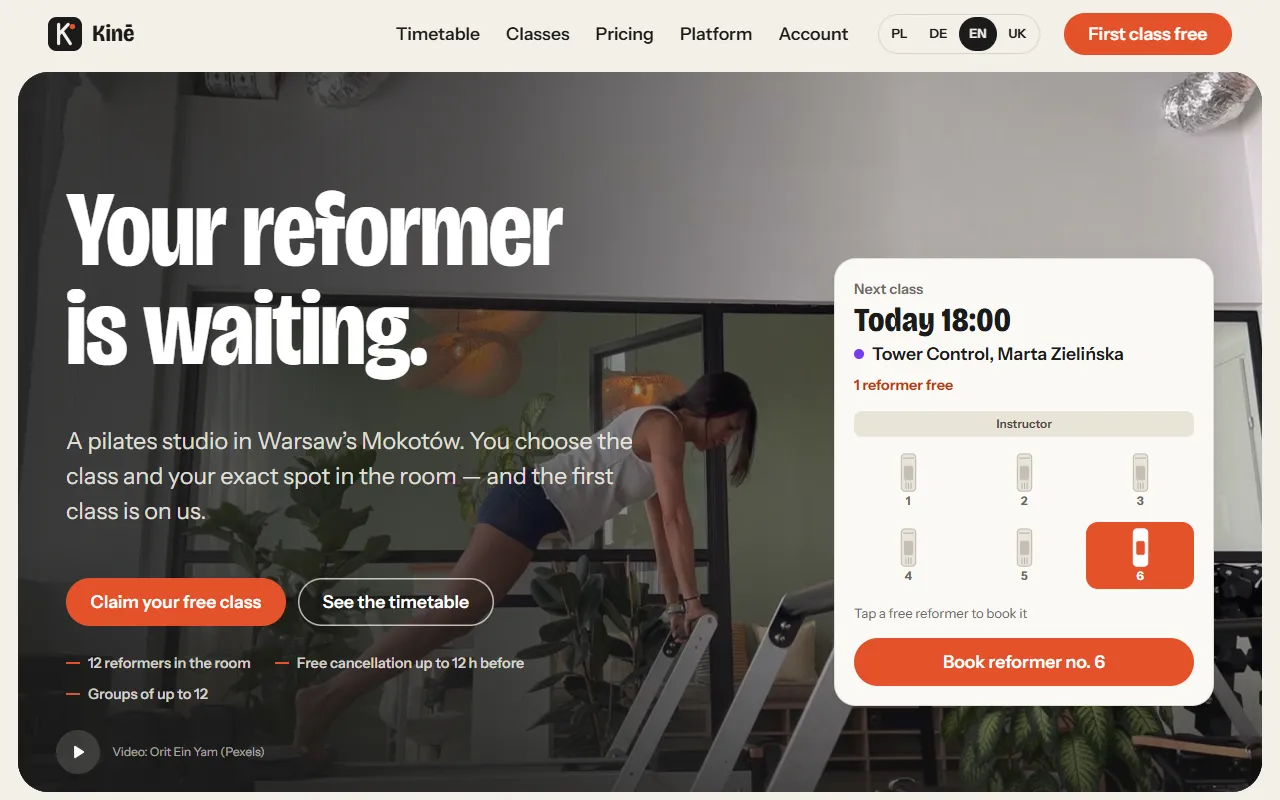
Kinē · Reformer & Pilates Studio is a Primessio concept project: a four-language website for a pilates studio connected to a complete studio management system. Clients pick a class and a specific reformer on the room map, pay with a class pack, join the waitlist or cancel with a refund — and the studio runs its timetable, attendance and KPIs in a panel. The studio, people and data are fictional; the backend, processes and tests are the same as in our client work.
A Primessio showcase for the fitness industry: design, content in four languages, bookings, class packs, a free first class, notifications and a studio panel — with its own backend on ordinary web hosting, checked by automated tests with real clicks, including on the live site.
Primessio is a software house based in Warsaw: websites and online stores, custom software and IT systems, SEO and AI SEO, social media and content, branding and project management — for clients in Poland and the DACH region. Below is one of our projects.
Live site
A presentation of 12 screens from the demo, watermarked — booking, the client account and the studio panel. The working demo opens with the button below after a short form; its data is fictional and refreshes daily. · Open the site in a new window ↗
Try the demo ↗ Open the studio panel (demo) ↗
The panel opens after a short form. Data and accounts are examples, and the demo resets every night.
Challenge
A reformer pilates studio sells a limited number of places: the room has 12 reformers and the tower 6 spots. Typical booking tools don’t show which reformer is free, get the waitlist wrong and don’t enforce the rules — how late you can cancel with a refund, who has already used the free class, how many bookings a partner card allows at once.
On top of that, the studio needs a website that brings in new clients from search, speaks Polish, German, English and Ukrainian, and runs on ordinary hosting — with no separate server and no booking-software subscription.
Solution
We built the website and the studio management system as one product. The timetable shows free places live, and in the booking flow the client picks a specific reformer on the room map. A booking reserves a credit from the class pack; when a class is full the client joins the waitlist and is promoted automatically if someone cancels at least 2 hours before the start. Cancelling up to 12 hours before returns the credit; later, it is lost.
The studio runs everything in the panel: a weekly timetable from templates, attendance, cancelling a class with a refund for everyone, balance corrections, pausing a pack and KPIs — occupancy, conversion from free classes, no-shows. Emails and reminders 24 hours before class go out through a queue with retries, and integrations receive signed webhooks.
Scope — what we delivered
Design
A “kinetic editorial” direction: Bricolage Grotesque typography, a room map of reformers in the hero, class video and levels shown as a number of springs.
Content PL · DE · EN · UK
Transcreation per market, localised page URLs and Cyrillic on the Ukrainian site (a separate typeface with the full character set).
Booking a specific reformer
A room map with live free places, a waitlist with automatic promotion and protection against the race for the last spot.
Class packs and free class
Single classes, packs of 5/10/20, an unlimited month, pausing for holidays; the first class is free once per person — checked by email and phone.
Client account
Bookings, balance, history, cancellation with refund information and a private iCal feed with a replaceable key.
Studio panel
Weekly timetable, attendance for instructors, class cancellation with refunds, clients, timetable templates and KPIs with an occupancy chart.
Notifications and integrations
An email queue with retries, reminders 24 h before class in four languages, HMAC-signed webhooks and a test payment page.
SEO / AEO
Pages for six class formats and a reformer pilates guide with the answer up front, FAQPage, hreflang in four languages and llms.txt.
Assistant on the studio’s website
A rule-based assistant in four languages on every page of the studio’s website. It answers only from the site’s content: class formats, prices and passes, rules, directions and opening hours. When asked to “find classes” it asks about format and time of day, then opens the schedule with the filters set and points to a specific session. It refers health questions to a doctor or physiotherapist and reminds visitors to tell the instructor; in an emergency it gives 112 and does not link to the schedule. It asks visitors not to type personal data and does not keep the conversation. The demo can be rated in 30 seconds, with a voucher as a thank-you: €250 net towards Primessio running a Google Ads campaign, valid for your next project with Primessio (terms in the rating window).
Tests and deployment
Backend tests, tests with real clicks, a test of the package on a test server before upload and an automatic live check after every deployment.
The full chain — what Primessio delivered
Primessio runs projects from analysis to campaign, in one place. In this project we delivered:
-
Concept
Studio rules: per-reformer booking, passes, waiting list.
-
Build
Website and studio software: backend, panel, tests.
-
Content
Website copy transcreated PL/DE/EN/UK.
-
SEO, AEO and LLM
Structured data, FAQ schema and llms.txt.
The other stages — Analysis · Campaigns · Measurement and growth — are also part of our full service. See how full service works →
How it works — step by step
This is the system in day-to-day use: first through the eyes of a client booking a class, then through the eyes of the studio running the timetable. It matches the working demo, which opens after a short form.
The client
-
Finds a class
On the site in her own language — Polish, German, English or Ukrainian — she browses the weekly timetable, with the level, the instructor and free places shown live.
-
Picks a specific reformer
In the booking flow she sees the room map and chooses her spot. Taken reformers are greyed out, and the last free place can never go to two people at once.
-
Pays for the class
She uses a pack of 5, 10 or 20 classes or an unlimited month, her free first class (once per person) or a partner card — with no more than two active bookings.
-
Gets a reminder
Confirmation arrives by email straight away and a reminder 24 hours before class. A private iCal link puts her bookings in her own calendar too.
-
Cancels with a refund
Up to 12 hours before the start she cancels in her account and the credit goes back on her balance. If the class was full, the first person on the waitlist takes her place automatically.
The studio — front desk and instructors
-
Builds the timetable from a template
The front desk sets up a weekly template — format, room, instructor and number of places — and generates the coming weeks from it rather than typing them in.
-
Runs bookings and the waitlist
The system enforces the booking window, partner-card limits and the free class by itself. When someone cancels at least 2 hours before class, the first person on the waitlist is promoted without the front desk stepping in.
-
Takes attendance
The instructor sees the class list with reformer numbers and marks who turned up; no-shows feed into the KPIs.
-
Cancels a class with refunds
If an instructor is off sick, the front desk cancels the class in one step: everyone booked gets their credit back and an email.
-
Reads the KPIs
The panel shows occupancy, conversion from free first classes and no-shows. Balance corrections, pausing packs for holidays and client records sit in the same place.
Capabilities and extension options
The system is modular. These are modules we can add when building it for your studio — the scope is matched to how your studio works and to the tools you already use.
Options for a client build — not part of the project shown.
Online payments and memberships
We can connect a payment provider: buying class packs on the site, paying for single classes and a monthly membership renewed on a card stored with the payment provider.
Business benefit: Fewer payments taken at the front desk and predictable membership income.
Mobile app (PWA) with notifications
We can add an app installed straight from the browser, with no app store: timetable, booking and account behind an icon on the home screen, with push notifications when a place frees up or the timetable changes.
Business benefit: Booking in a few taps, and news of a freed-up place reaches interested clients straight away.
Corporate wellness and benefit cards
We can connect verification to the systems of the sports-card operators your studio works with: checking the card at booking and settling visits on the operator’s side.
Business benefit: No manual card checks at the front desk, and visit settlements with the operator match the timetable.
SMS reminders
We can add text-message reminders alongside emails: before class, on promotion from the waitlist and when the studio cancels a class — with the client choosing the channel in her account.
Business benefit: Helps cut no-shows — the message reaches clients who don’t check their email regularly.
Multiple locations and rooms
We can extend the system with further studios and rooms, each with its own room map, timetable and instructors — sharing one client account and packs valid at every location.
Business benefit: One tool when you open a second location, with no second system and no double admin.
Owner reports and accounting export
We can add monthly summaries — pack sales, credits used, occupancy by format and instructor — and an export file for your accountant.
Business benefit: Timetable and pricing decisions based on data, and month-end without retyping.
Gift cards and referrals
We can add gift cards with a code redeemable at booking, and a referral scheme in which the client and the friend she refers each get an extra class.
Business benefit: An extra route to new clients — through existing clients and through gifts.
Instructor calendars and staff rota
We can sync classes with the calendars on instructors’ phones and add a staff rota with availability, cover and an hours summary for payroll.
Business benefit: Fewer phone calls about cover and a smoother sign-off of instructors’ hours.
Assistant with a language model
We can connect the on-site conversation to a language model that answers only from the studio’s website content, keeping today’s boundaries: no health advice, with a pointer to a doctor or physiotherapist and to the studio’s contact details.
Business benefit: Answers to questions phrased in the visitor’s own words.
In numbers
A concept project has no sales results — these are verifiable facts from the repository and from tests on the live site.
How we worked
Three stages, each with its own plan and review: backend first, then the website, finally the panel and deployment — each closed with tests before the next began.
Specification
The studio’s rules written down as rules: booking window, refunds, waitlist, free class, partner cards.
Backend
A lean backend with a relational database: transactions that never sell one reformer twice, and tests for every rule.
Website
Static site with interactive elements, the timetable and booking flow, content in four languages, no repeated photos.
Panel and hardening
Studio panel, notifications, a security review and an independent code review with fixes covered by tests.
Deployment
Package tested on a test server, encrypted upload and an automatic check of pages, API and access blocks on the live site.
Technology
A lean backend with a relational database — it runs on ordinary shared hosting, with no separate server. Application code and data are blocked from the browser, and the system won’t start without its configuration file. The site itself is static, so it loads fast; small interactive elements fetch the live data.
- Web application
- Relational database
- Automated tests
- Static site
- Interactive elements
- Rule-based assistant
- Scroll-driven animations
- iCal
- HMAC webhooks
- Schema.org
- hreflang
- E2E tests
- PL · DE · EN · UK
Frequently asked questions
Is this a real studio’s website?
No. Kinē · Reformer & Pilates Studio is a Primessio concept project — the studio, instructors, prices and contact details are fictional, and payments run in test mode. The studio management system, panel and tests are real and the same as in our client projects.
Is the assistant on the website AI?
No. It is a rule-based assistant: it recognises questions by keywords in four languages and answers only from the content of the studio’s website. It runs in the browser, does not keep the conversation, and its only request to the server is fetching the public schedule. It gives no health advice — it refers to a doctor or physiotherapist — and asks visitors not to type personal data into the chat. In a live build the same conversation can be connected to a language model.
Does the system need its own server?
No. The backend, with a relational database, runs on ordinary shared hosting. Code and data are blocked from the browser, and notifications go out without a separate background process — optionally, a scheduled job in the hosting panel is enough.
How does the system stop one reformer being sold twice?
Every booking runs in a transaction with a database lock, and each spot has a unique index. A test starts four processes at once racing for the last free place — exactly one always wins, and the others get a clear message and a refreshed room map.
Can online payments and partner cards be connected?
Yes. The demo uses a test payment page and checks test partner-card numbers. In a real project we connect a payment provider and the card operator’s verification — the rules for packs and booking limits stay the same.
How does the studio panel work?
Instructors see the timetable and mark attendance; the front desk can also cancel classes with refunds, correct balances, pause packs, manage the timetable templates and see KPIs. In the demo you can sign in as an instructor or the front desk — real visitors’ data is hidden.
Does the site help bring in new clients from search?
Yes — each of the six formats has its own page with the answer up front, the class structure, who it suits and an FAQ, and a reformer pilates guide ties them into one topic. All in four languages, with structured data and llms.txt for AI assistants.
How much does a booking system for a pilates studio cost?
It depends on the scope: whether you need just the website with booking, or also the panel, online payments, an app or several locations. We prepare a quote after a conversation, once we know your studio’s rules and the modules you need — the working demo helps pin down what the studio actually needs.
Can I move my data over from my current system?
Yes, as long as your current system lets you export it — usually as a CSV file or a spreadsheet. We migrate clients, pack balances and upcoming bookings, and before switching over we compare both systems so that no credit goes missing.
How long does implementation take?
That depends on the number of modules and languages. We start by writing your studio’s rules down as rules, then build and test the system in stages, each with its own review. We agree the timeline after a conversation, together with the quote.
Is the demo publicly available?
The working demo opens after a short form — the link arrives by email. Publicly we show a presentation of 12 screens, and this page describes step by step how the system works for the client and for the studio.
Related services and projects
Do you run a pilates, yoga or fitness studio?
We’ll design and build an end-to-end system for your studio — booking, class packs, a waitlist and a front-desk panel — together with the website, on your rules and on the hosting you already have.
Let’s talk